
Digital Detox for AI Overload: How to Stay Human in the Age of ChatGPT
February 20, 2026
Protect Your Digital Wellbeing: A Privacy Hygiene Checklist
February 20, 2026
What causes Zoom fatigue (cognitive load, self‑view)
If you’ve ended a day of video calls feeling strangely depleted, you’re not imagining it. A foundational Stanford analysis identifies nonverbal overload as a key contributor: unnatural amounts of close-up eye contact, constrained movement, persistent self-view, and cognitively demanding turn-taking all increase the cognitive load during video meetings. In short, your brain is working overtime to interpret signals it doesn’t usually process this way.
Two mechanisms matter most:
- Self‑view = mirror effect. Watching yourself in real-time increases self-monitoring and self-critique, which consume cognitive resources. It’s the mental equivalent of someone holding a mirror to you all day—distracting and draining.
- Cognitive load (CLT). Cognitive Load Theory reminds us that working memory is limited; when interfaces add extraneous load (e.g., too many faces, cluttered on-screen information), we crowd out bandwidth for meaningful processing. Minimising extraneous load and encouraging germane load (the productive kind that helps form schemas) improves learning and reduces fatigue.
Zoom fatigue tip: Hide self‑view, shrink the gallery to “speaker only” when possible, and simplify on‑screen stimuli (slides > walls of faces; clean backgrounds; fewer parallel chat streams). These small choices lower extraneous load.
Meeting hygiene: shorter, fewer, clearer agendas
Poorly designed meetings don’t end when the calendar alert does. Research on “meeting hangovers” reveals lingering negative effects on engagement and productivity hours after a poor meeting—especially those that were unfocused, too long, or comprised the wrong attendees.
Evidence reviews suggest that smaller, shorter, purpose-built meetings with explicit agendas and a clear decision framework are more effective. Up to one-third of meetings may be unnecessary, and the single biggest barrier to productivity is a lack of uninterrupted focus time.
Try this, exactly:
- Agenda as questions. Frame items as “questions to be answered” (e.g., “What budget option are we approving?”). You then know who truly needs to attend—and when you can end.
- Default to 25–50 minutes. Shorten 30‑minute meetings to 25, 60‑minute meetings to 50 and protect buffer time between calls. (This aligns with evidence on stress reduction from breaks; see the microbreaks section.)
- Decision log + next steps. End with the decision, owners, deadlines, and how outcomes will be documented asynchronously.
“Camera optional” norms
A randomised within‑person field experiment (four weeks, 103 employees) found that camera‑on meetings increase daily fatigue and subsequently reduce engagement and voice—effects that are stronger for women and organisational newcomers, likely due to heightened self‑presentation pressure. In contrast, camera‑optional norms help preserve energy and participation.
Where “camera optional” works well:
- Internal check‑ins, stand‑ups, status updates—when visuals add little.
- Focus‑time respect: If someone signals eye‑strain or cognitive overload, allow camera‑off without penalty.
Reserve camera‑on for rapport‑building, onboarding, and discussions where nonverbal cues materially change outcomes (e.g., conflict resolution).
Policy wording you can adopt:
“By default, our meetings are camera‑optional. Use video when it improves clarity or connection; feel comfortable turning it off to manage energy, personal circumstances, or accessibility needs.”
This approach supports hybrid work wellbeing without sacrificing collaboration quality.
Microbreaks and recovery windows
Microsoft’s Human Factors Lab used EEG caps to visualise stress across back‑to‑back video meetings: without breaks, beta‑wave activity (stress) accumulates; inserting 10‑minute breaks enables a brain “reset,” improving focus in the next session.
Meta‑analytic evidence shows microbreaks (30 seconds to ~10 minutes) reduce fatigue and boost vigour, with longer breaks having stronger effects on performance—especially for tasks with lower cognitive demands.
Practical microbreak pattern (science‑aligned):
- Every 30–45 minutes: stand, stretch shoulders/neck, walk for 1–2 minutes.
- 20‑20‑20 eye rule: every 20 minutes, look at something 20 feet away for 20 seconds. (Endorsed by the American Optometric Association; combats digital eye strain.)
- Schedule buffers: set calendar defaults to auto‑shorten meetings (e.g., 25/50 minutes). Use the buffer for water, movement, or a brief breathing practice.
Stanford EH&S also recommends microbreaks every ~20 minutes to lower musculoskeletal risk during prolonged computing.
Ergonomics that prevent physical strain
Zoom fatigue isn’t only cognitive—it’s physical. Non‑optimal setups drive neck/shoulder pain, headaches, and arm/wrist strain. The OSHA Computer Workstations eTool and Cornell CUErgo guidelines converge on the same basics: maintaining neutral postures, supporting the lumbar spine, and placing screens/input devices to avoid awkward reach and neck flexion.
Your quick ergonomic checklist:
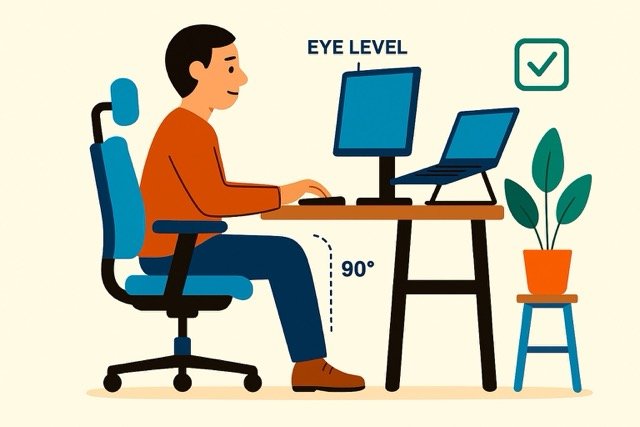
- Chair: backrest supports the lumbar curve; knees ~90°, feet flat (use a footrest if needed).
- Screen: top of monitor at or just below eye level; at least an arm’s length away; tilt to reduce glare.
- Keyboard/mouse: at elbow height; wrists neutral; keep the mouse close to avoid shoulder abduction.
- Laptop users: add an external keyboard/mouse and prop the laptop so the screen hits eye level; otherwise, you’ll trade neck strain for wrist strain.
Regular micro‑adjustments and position changes also reduce static‑posture load throughout the day.
Async‑first: when email or docs beat meetings
“Async‑first” means defaulting to written updates, shared docs, recorded clips, and comment threads when real‑time discussion isn’t essential. Evidence syntheses on meeting effectiveness show that over‑scheduling reduces focus time and that many meetings are unnecessary; shifting routine updates to asynchronous channels frees cognitive capacity for deep work.
Practitioner research across distributed teams (Asana, Atlassian, DigitalOcean) highlights how clear documentation, defined response windows, and recorded briefings improve decision quality while reducing video meeting fatigue.
Use async when:
- The goal is information transfer (status, metrics, decisions already made).
- Time zones make synchronous alignment costly.
- You need deliberation time (written proposals enable thoughtful review vs. real‑time pressure).
Keep it effective: share a decision memo with context, options considered, and the chosen path + owner; invite comments for 24–72 hours before locking the decision.
Summary
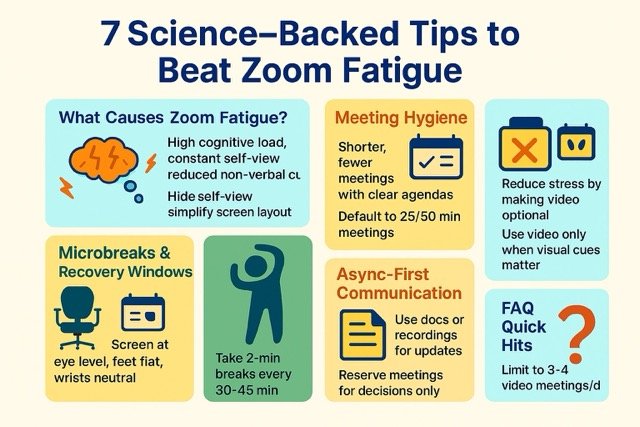
7 Science-Backed Tips to Beat Zoom Fatigue:
- What Causes Zoom Fatigue? – Hide self-view, simplify screen layout.
- Meeting Hygiene – Shorter, fewer meetings with clear agendas.
- Camera-Optional Norms – Reduce stress by making video optional.
- Microbreaks & Recovery Windows – Take 2-min breaks every 30–45 min.
- Ergonomic Setup – Screen at eye level, knees at 90°.
- Async-First Communication – Use docs or recordings for updates.
- FAQ Quick Hits – Limit to 3–4 video meetings/day.
Pulling it all together: a one‑week reset plan
- Monday—Agenda hygiene: Convert your recurring meeting agendas into questions, trim attendee lists, and shorten durations.
- Tuesday—Camera norms: Publish a camera‑optional statement for internal calls; leaders model turning video off when not needed.
- Wednesday—Async shift: Move status updates to a shared doc or recorded 3–5 minute clip; invite questions in comments.
- Thursday—Ergonomic tune‑up: Adjust chair, screen, and input devices; test posture against OSHA/Cornell checklists.
- Friday—Microbreaks ritual: Set calendar defaults to create buffers; practice the 20‑20‑20 rule and brief movement between calls.
FAQ
Zoom fatigue” different from regular meeting fatigue?
Yes. Video meetings create nonverbal overload (close-up gazes, constrained movement, persistent self-view) that raises cognitive load beyond in-person norms, making them more exhausting for many people.
Do camera‑off policies reduce fatigue without hurting engagement?
A four-week randomised field study found that camera-on days increased fatigue and decreased engagement/voice; making video optional mitigated these effects, especially for women and newcomers.
How long should breaks be to counter meeting stress?
Microsoft’s EEG study suggests ~10‑minute breaks between meetings allow the brain to reset; meta‑analysis shows even shorter microbreaks reduce fatigue and increase vigor, with performance gains growing with break length
What’s the simplest eye‑strain fix during long video days?
Use the 20‑20‑20 rule: every 20 minutes, look 20 feet away for 20 seconds. It’s an optometrist‑endorsed, evidence‑informed habit that relaxes accommodative muscles.
Is there a “right” meeting length?
Evidence suggests that shorter, purpose-built meetings are more effective and help protect focus time. Many organisations default to 25/50 minutes to preserve recovery buffers; effectiveness depends more on clear purpose, the right attendees, and tight facilitation than on a specific duration.