
Digital Burnout vs Cognitive Fatigue: Why Screens Exhaust You Differently
March 16, 2026
Always‑On Culture: How to Set Digital Boundaries Without Harming Your Career
March 16, 2026
Why This Topic Matters Now
In day‑to‑day digital life, many professionals feel busy yet oddly unproductive. The day is peppered with pings, banners, vibrations and pop‑ups, and by late afternoon thinking feels heavier than it should.
That is notification overload at work, and it thrives in hybrid setups where email, chat, calendars and task tools replace quick corridor conversations. Large workplace studies show the modern workday is saturated with digital signals and fragmented attention, especially in flexible and remote environments.
This matters because alerts now leak into commutes, kitchens and evenings, keeping people responsive but never truly at rest. News and social feeds compound the effect, with psychologists reporting rising stress from constant media exposure and “doomscrolling”.
Understanding the Core Issue
An alert is not just a sound. It triggers an orienting response that asks the brain to evaluate: “deal now or later?” Even when you ignore it, the mental model of your current task is disturbed and must be rebuilt—what researchers often describe as resumption or restart costs. A widely cited field study of interruptions found that external disruptions can delay resumption and degrade performance; frequent notifications compound this effect.
Frequent switching also creates cognitive fatigue. After sustained exertion and many micro‑choices, people show reduced self‑control and persistence—classic decision fatigue—and default to easier actions or avoidance.
Add media multitasking, and you magnify the problem: heavy multitaskers tend to show weaker inhibitory control and working memory (though effects vary across measures), making it harder to ignore the next ping.
How This Issue Shows Up in Real Life
Work: email open all day, chat badges accumulating, calendar reminders stacking up—resulting in shallow engagement and repeated restarts. People describe rereading the same paragraph, missing small details, or deferring complex writing to “when it’s quieter”. Frequent switching worsens cognitive fatigue across a day.
Home: alerts spill into meals and school runs. Even a silent vibration can create a sense of urgency, keeping attention “half‑there”. Clinicians and psychologists note heightened stress from ongoing news and social feeds, which adds to digital load.
Evenings and sleep: heavier social media/device use is linked with later sleep onset and shorter duration in UK adolescents—patterns many adults recognise too. Consensus statements highlight nighttime screen use as a risk to sleep health; lighter evenings help with attention the next day.
Why This Matters for Digital Wellbeing
Notification overload raises mental load, reduces perceived control and keeps the nervous system in a mild “ready” state. Over weeks and months, that shows up as irritability, lower patience and a feeling that thinking takes more effort.
This is not alarmism; it is the steady erosion of deep work time and recovery. Public‑facing psychology bodies report increased stress with media saturation, and hybrid work data consistently shows that unmanaged digital signalling fragments the day.
Practical Strategies That Actually Help
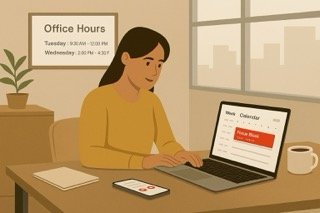
Make focus the default. Schedule 60–90‑minute focus blocks and keep the inbox closed between checks. Teams that protect focus windows report clearer, calmer execution in hybrid settings.
Batch communication. Check email and chat at set times (for example, mid‑morning, mid‑afternoon). Batching reduces restart costs without harming responsiveness.
Reduce alert surfaces. Turn off non‑essential banners and badges, mute large channels, and unsubscribe from noisy automation. You can still retrieve information when you choose.
Agree on response expectations. Document “office hours”, typical response times and escalation routes so people can focus without fear of missing something critical. Hybrid organisations that codify norms see smoother collaboration with fewer interruptions.
Protect evenings. Move stimulating screen time earlier. Night‑time exposure is associated with delayed sleep and shorter duration; better sleep supports next‑day attention.
Technology That Supports Focus (Rather Than Steals It)
The problem is rarely the tool—it is the default settings and team norms. With a few changes, technology actively protects attention.
Focus/quiet modes on devices. Use platform focus modes during scheduled deep‑work blocks. Allow calls or messages from a small “favourites” list to pass through for genuine urgency. Organisations that normalise visible focus time reduce ambient pressure to check.
Granular notification tuning. In chat tools, mute high‑traffic channels by default and enable alerts only for direct mentions; in email, filter automated messages to a separate view. People often report an immediate drop in mental noise once badges and banners are gone.
Team‑visible norms inside tools. Add “office hours” to shared calendars and pin a simple norms document in the team space (response windows, meeting hygiene, escalation). This prevents ad‑hoc nudges and clarifies when a message needs an immediate response.
Strategic switching. When you are in a low‑efficacy lull, a deliberate switch can sometimes restore momentum, but frequent unscheduled switching increases fatigue. Treat switching as a planned choice, not a reaction to pings.
Two real‑world composites:
• A consulting team limited Slack checks to two windows per day and muted all non‑mention alerts. Response quality improved, and end‑of‑day fatigue eased because people replied with full attention. This fits with evidence that fewer interruptions reduce restart costs and cognitive strain.
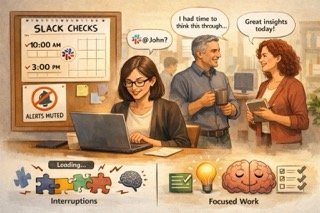
• A university admin group published shared office hours and used calendar focus blocks. Queries flowed to the right channels and “urgent” actually meant urgent. Hybrid work research shows clear norms are a key enabler of productivity and wellbeing.
Common Pitfalls and What Doesn’t Help
Relying on willpower. Trying to ignore pings while they keep appearing keeps the brain on alert and exhausts self‑control reserves. Adjust the environment instead.
All‑or‑nothing detoxing. Total disconnection can feel good briefly but is hard to sustain at work. Reduce alert frequency and make availability predictable.
Adding more tools. Extra dashboards can create more notifications. Fewer, clearer channels almost always help.
Final Thoughts
If constant alerts are damaging focus, it is not a personal failure. It is a sign that digital systems are interrupting more than they support. Small changes to how notifications are managed can make work feel calmer, clearer, and more humane.
Progress comes from designing digital environments that respect attention, not from expecting people to be endlessly available. Protecting focus is not about doing less. It is about creating the conditions to think properly again.
Frequently Asked Questions
What is notification overload at work?
Notification overload at work happens when frequent alerts from emails, messaging apps, and tools repeatedly interrupt attention, making sustained focus difficult.
Why do constant alerts reduce concentration?
Each alert forces the brain to pause, assess, and switch context. Over time, this repeated switching makes thinking feel slower and more effortful.
Is turning off all notifications the best solution?
Not usually. Reducing frequency and setting clear boundaries tends to work better than complete disconnection, which can increase anxiety.
Does notification overload affect wellbeing as well as productivity?
Yes. Constant alerts increase mental load and reduce recovery time, which can affect mood, patience, and sleep over time.
How can teams reduce notification overload together?
Shared expectations around response times, fewer default alerts, and protected focus periods help reduce pressure across the whole team.