

Why Mental Health Matters for University Students
September 14, 2026
Zoom Fatigue Solutions: 7 Science‑Backed Tips for Hybrid Workers
September 14, 2026
You don’t have to quit technology to feel human again—you just need smarter boundaries.
Last Tuesday at 4:45 p.m., Mariam closed her laptop with that familiar, foggy feeling: twelve “quick” AI prompts, four half‑finished drafts, a meeting that could’ve been a paragraph, and a Slack thread about a thread. By dinner, her brain felt like a tab bar with no end.
Sound familiar? That’s AI overload—not a moral failing, but an understandable outcome when powerful assistants meet unlimited inputs and constant notifications.
Why AI Overload Happens (and why it’s not your fault)
Infinite inputs: The more prompts you can send, the more decisions you have to make—what to ask, how to refine, when to stop. That decision fatigue adds up.
Always‑on channels: Notifications, mentions, and “quick checks” erode deep work.
Productivity theatre: It’s easy to confuse prompt volume with progress. Output ≠ outcome.
The fix isn’t less intelligence—it’s better boundaries that protect time, attention, and energy. Google’s “people‑first content” approach mirrors this: keep things useful, intentional, and grounded in real value, not just volume.
The 7‑Step AI Detox Framework
Think of this as a reset you can start today, finish in two weeks, and then keep as a weekly habit.
1) Run a 2‑Day Attention Audit
For the next 48 hours, simply notice:
- When do you open AI tools (and why)?
- What triggers you to “just check” them?
- Which notifications interrupt deep work most?
Tip: Keep a sticky note beside you. Write down each interruption. You’ll be surprised how often “just one prompt” turns into ten.
Example: Mariam, a project lead, tracked every AI interaction for 48 hours. She discovered 70% of her prompts were “just checking” ideas—not essential tasks. That insight helped her cut unnecessary usage by half.
2) Create “Assist Blocks” (Time‑boxed AI sessions)
AI is fantastic in sprints, not throughout the whole day.
- Morning Assist (30–45 mins): Drafts, outlines, planning.
- Midday Assist (20 mins): Data checks or polishing.
- End‑of‑Day Assist (15 mins): Summaries, next‑day prompts.
Close the tab outside these windows. It’s the easiest way to turn AI into a tool, not a tap.
3) Install a Prompt Gate
Before you open an AI tool, ask yourself:
- Outcome: What decision or output will this prompt help me make—today?
- Ceiling: How will I know it’s “good enough”?
- Stop rule: What’s my cut‑off (time or iterations)?
Write these three on a card. If you can’t answer them, you don’t need a prompt—you need clarity.
Example: A content writer set a 15-minute cap per prompt session. She finished blogs faster and avoided endless “perfecting.”
4) Batch Notifications (Twice Daily)
Silence non‑essential alerts. Then, set two windows:
- 11:30 a.m. and 4:00 p.m. to clear mentions/messages.
Everything else waits. You’ll recover hours of deep focus—no app required.
People-first productivity consistently prioritises clarity and focus over noise—a principle echoed by modern search quality guidance: avoid the “always on” churn and deliver real value.
Example: A fintech team muted AI alerts and Slack pings outside two windows (11:30 a.m. and 4:00 p.m.). Within a week, their focus scores jumped 30%.
5) Use “Intent Boards” for Complex Work
When a task spans multiple prompts (e.g., report, proposal, curriculum):
- Write a one‑page Intent Board: scope, audience, tone, must‑include evidence, and your red lines (what not to do).
- Feed the Intent Board to your assistant as the single source of truth.
This reduces re‑prompting and keeps the work aligned with your actual goals.
Example: A university lecturer created a one-page Intent Board for a syllabus update: audience, tone, and must-have topics. Feeding that into AI reduced re-prompts from 12 to 3.
6) Adopt the 3×3 Outcome Rule
For any AI‑assisted project, define:
- 3 concrete deliverables (e.g., executive summary, slide deck outline, action plan)
- 3 decision checkpoints (e.g., does this meet the brief? are we confident in the data? is the tone right?)
When those are met, stop. Over‑polishing can burn a whole afternoon.
Example: A startup founder defined 3 deliverables (pitch deck, summary, email) and 3 checkpoints. She stopped over-polishing and shipped work 40% faster.
7) Close With Human Judgment (Always)
AI can draft and organise, but you decide:
- Is this credible, ethical, and kind?
- Does it reflect our context and people?
- Is there anything sensitive that needs a manual pass?
Make a final checklist part of your ritual—your values are the last filter.
Example: A legal team uses AI for drafting but always applies a “human pass” for ethics and tone. It’s their non-negotiable safeguard.
A 14‑Day AI Detox (You can start Monday)
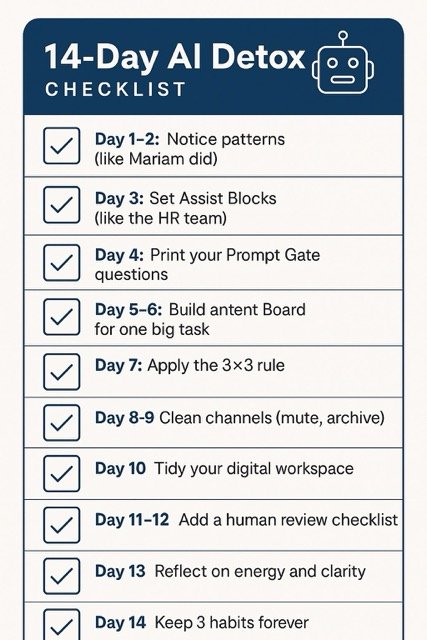
Day 1–2: Notice
Run the 2‑day attention audit. List your top 5 interruptions.
Day 3: Boundaries
Create three Assist Blocks. Silence non‑essential notifications.
Day 4: Prompt Gate
Print the 3 prompt questions. Place them beside your keyboard.
Day 5–6: Intent Boards
Choose one complex task and build a 1‑page Intent Board.
Day 7: Outcome Rule
Set the 3×3 outcomes for the week’s biggest project.
Day 8–9: Clean Channels
Unfollow low‑value feeds; archive stale threads; mute noisy channels.
Day 10: Focus Environment
Tidy your digital workspace. One window. One task. 50 minutes.
Day 11–12: Human Review
Implement a “human pass” checklist for tone, ethics, and context.
Day 13: Reflection
Journal what changed: energy, output quality, time recovered.
Day 14: Keepers
Choose 3 habits to keep. Schedule them as weekly calendar repeats.
Want a printable version?
Download 14-Day AI Detox Checklist (PDF)
What to Do When You’re Already Overwhelmed
- The 7‑minute reset: Close all tabs, open a blank document, write your top 3 outcomes for the next hour.
- The 2‑prompt cap: For the next 60 minutes, allow only two prompts. If neither moves you forward, switch to a human first draft.
- The friendly handoff: Ask a colleague for a 10‑minute test: “Does this meet the brief?” If yes, ship it; if not, adjust once—then ship.
Tools That Quiet the Noise (no brand loyalty required)
- Time‑box helpers: Any Pomodoro app or a phone timer will do.
- Notification controls: Built‑in settings on your OS and apps are enough if you apply them consistently.
- Distraction blockers: Use them for deep‑work windows, not all day—your brain needs some flexibility.
Focus beats friction: most of the gain comes from clear routines, not fancy tooling. Keeping your content and workflows “people‑first” tends to outlast trend cycles and algorithm changes.
A Workday That Actually Feels Good (Example)
9:00–9:20 – Plan the day; set 3 outcomes.
9:20–10:05 – Deep work block (no AI yet).
10:05–10:20 – Morning Assist: one prompt for outline; one for examples.
11:30–11:45 – Notification batch #1.
12:00–1:00 – Lunch & walk (no screen).
2:00–2:45 – Deep work block (draft by hand or with minimal AI).
3:00–3:20 – Midday Assist: polish, check logic, tighten headings.
4:00–4:15 – Notification batch #2.
4:30–4:45 – End‑of‑Day Assist: summary + tomorrow’s first prompt.
Evening – Screens down 60 minutes before bed; light music or reading.
Ethical & Mindful AI Policies for Teams (copy, adapt, use)
- Purpose over volume: We measure outcomes, not prompt counts.
- Working hours: AI use follows the same boundaries as email and chat.
- Privacy first: No sensitive data in prompts without explicit approval.
- Human pass: Final judgment remains human; we own our words and impact.
- Kindness: We choose clarity, consent, and respectful tone—even under pressure.
Final Word
If you’ve felt more exhausted than empowered by AI lately, you’re not alone. The goal isn’t to be less intelligent—it’s to put intelligence in its place.
Start small: one Assist Block, one Prompt Gate, and notifications twice a day. Give it 14 days. Chances are, you’ll keep the leverage, feel more human, and end your day with a brain that’s actually yours.
Frequently Asked Questions
Is “AI detox” just quitting tools?
No. It’s rebalancing: you keep AI’s leverage but limit its noise by using time‑boxes, stop rules, and clear outcomes.
What if my role requires constant AI use?
Use Assist Blocks (short, powerful windows) and a Prompt Gate. You’ll likely produce better work, faster—and feel less scattered.
How do I know the detox is working?
Look for energy and clarity at 4 p.m., fewer half‑finished drafts, and faster decisions. If your evenings feel calmer, you’re on the right track.
Is there research behind “people‑first” productivity?
At a high level, modern search and content quality frameworks emphasise usefulness, clarity, and intent—values that naturally reduce overload when applied to daily workflows.